Preventing Version Info Leakage with Dotdeb’s PHP 5.3.2 for Debian
There are plenty of arguments for and against Security Through Obscurity – I’m of the opinion that while the benefit for doing it might be slim, actually implementing it doesn’t cause any problems, so why not?
Moving On! The fastest way to upgrade the PHP version on Debian/Lenny “stable” without running into dependency hell is through the dotdeb repositories. Not only does it allow you to upgrade to PHP 5.3.2, you also get the ability to install PHP-FPM through the Debian package manager, instead of having to re-compile PHP from source.
There is one small problem though – once you upgrade using the Dotdeb repository, all your PHP pages have an “X-Powered-By” header included:
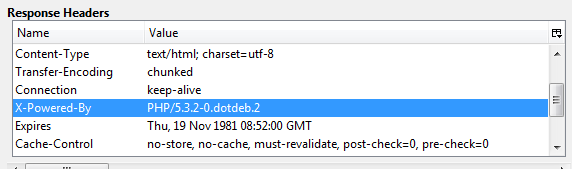
If you are serving PHP content using Apache/2 alone, fixing this is relatively simple. Enable mod_headers as follows:
a2enmod headers
Then add the following line to your Virtual Host definition: (( Note: I don’t use Apache as my front-end web server anymore so this isn’t tested by me. That said, it should work ))
RequestHeader unset X-Powered-By
Now reload your Apache configuration and the header information should disappear when you do a full refresh of the page in your browser.
On the other hand, it becomes a little more complicated if you are using Nginx as your public web-server and proxying PHP requests to a backend Apache process. Depending on how your Nginx setup is configured to handle PHP requests, you may need to use one of two approaches:
Approach 1 – Nginx directly serves PHP content by proxying to a PHP/FastCGI server
If you have installed PHP-FPM, you will know that it runs as a service listening for any requests on Port 9000. Hence, you could have Nginx serve PHP content using the following directives:
location ~* ^.*.php$ {
fastcgi_pass   localhost:9000;
fastcgi_param  SCRIPT_FILENAME  /var/www/mywebsite/$fastcgi_script_name;}
To hide your PHP version, add the following directive to the Nginx configuration:
#Prevent version info leakage
fastcgi_hide_header X-Powered-By;
Approach 2 – Nginx serves PHP content by proxying to an Apache process:
In this approach, the Nginx configuration for serving PHP content looks very different from Approach 1:
location ~* ^.*.php$ {
proxy_pass http://127.0.0.1:80;
}
The directive for hiding the version information also changes as Nginx is now acting as reverse-proxy:
#Prevent version info leakage
proxy_hide_header X-Powered-By;
Reload your Nginx configuration and check that the changes have taken effect by triggering a full refresh of the page in your browser:
