Fake story, real UI –Photoshop in the movies
From the Evernote archives…
Hollywood is well known for fake UI in movies – you know, “Unix is easy“1 or the “VB GUI Interface“. I’d say most geeks get a kick of seeing just how removed from reality Hollywood computers can be.
I was very surprised then to spot a familiar looking application during a scene in the movie “National Treasure” (a fairly forgettable movie otherwise):
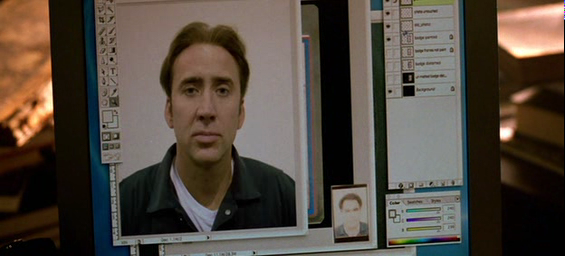
I think to myself “Wait. Isn’t that…?“. As if reading my mind, the Director zooms in for a closer look:
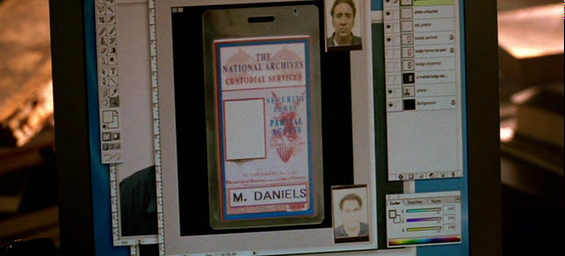
What? You don’t believe me. Ok, I created a comparison image those of you who say “fake”:
If that’s a fake, that’s a damn good one. I wonder if Adobe got any royalties for the use of their software in the movie. If they didn’t, I’d say they have pretty good grounds for a lawsuit right there
PS: That blue wallpaper in the background looks awfully familiar too. Any mac-heads can confirm/deny?
- Whoa! I did not realize this, but apparently the UI on screen during this screen is real! See this wikipedia article. Thanks Ashwin! [↩]
This entry was posted on Monday, February 9th, 2009 at 7:14 pm and is filed under Geek. You can follow any responses to this entry through the RSS 2.0 feed. You can leave a response, or trackback from your own site.
on February 9, 2009 at 8:41 pm Ashwin Nanjappa wrote:
It could be an old Photoshop running on Mac or something.
PS: The Jurassic Park UI is real. I know this because I’m a *huge* Jurassic Park fan
See fsn: http://en.wikipedia.org/wiki/Fsn
on February 10, 2009 at 8:04 pm Balaji wrote:
Ashwin – Whoa! I did not know that
. I’ve updated the article now. Can’t find any screenshots of the original FSN browser though
. Have you seen any?
I think it’s Photoshop CS2 running on OS X Tiger, but I’m not sure of the versions..
on February 11, 2009 at 8:29 pm Ashwin Nanjappa wrote:
Some screenshots:
http://hwr.nici.kun.nl/gifs/fsn.gif
http://www.useit.com/papers/information_overload/fsn1.png
http://iv.xight.org/images/FSN.png
http://www.javipas.com/wp-content/_FSN.png
on March 28, 2009 at 2:11 am Prithvi wrote:
I did a search on the standard backgrounds Mac offers and didn’t find a perfect match, although it looks similar to a couple of them.
That said, I’m running Leopard. I don’t know if Leopard’s backgrounds are different from Tiger’s.
on March 29, 2009 at 12:10 pm Balaji wrote:
Prithvi – thanks for the info. I do know that the default wallpapers are different for OS X Leopard and OS X Tiger. I had OS X Tiger installed on my PC as a VM for a while and seem to recall the stock wallpaper looked similar: http://www.winsupersite.com/images/reviews/tiger_01.jpg